
Every organisation has backups.
Almost every post-incident conversation starts the same way.
Yes, we had backups. No, we didn’t know they weren’t working.
Backups are the most psychologically comfortable control in the Essential 8 because they feel like a safety net. You set them up, you get confirmation that jobs are completing, and you move on. The problem is that a backup job completing successfully and a backup that can actually restore your environment under real conditions are two very different things.
The Essential 8 exists to make this distinction explicit. This control isn’t asking whether you have backups. It’s asking whether you have backups that work, that can’t be compromised, and that you’ve actually recovered from.
Most organisations can only confidently answer yes to the first part.

What ransomware does to backups
Ransomware operators understood years ago that backups were the primary recovery path, so they started targeting backup infrastructure first.
The pattern in a well-executed ransomware deployment isn’t to encrypt everything immediately. It’s to establish persistence, move laterally, identify and access backup systems, and then encrypt or delete backup data before triggering the visible payload. By the time the ransom note appears, the safety net is already gone.
On-premises backup servers connected to the same network as production systems are particularly vulnerable to this. Backup agents running with elevated credentials, backup consoles accessible from standard management networks, tape libraries with network-connected management interfaces. All of these represent paths to the backup infrastructure that a lateral-moving attacker can follow.
This is why the Essential 8 specifically requires that backups be disconnected from systems they protect, and why the architecture of how backups are stored matters as much as whether they’re running.
Immutability is not optional
The term immutable gets used loosely in vendor marketing, so it’s worth being precise about what it means in this context.
A truly immutable backup is one where the data cannot be modified or deleted by any process, including administrator-level processes on the systems being backed up, for a defined retention period. The immutability is enforced at the storage layer, not the application layer, and not by access controls that an attacker with sufficient privilege could modify.
Object lock on cloud storage is one implementation of this. The critical distinction is whether the lock can be removed by credentials that exist within your environment. If an attacker who has compromised your domain admin account can also reach and modify your backup retention settings, the immutability is weaker than it appears.
The architecture that actually solves this separates the backup control plane from the production environment entirely. Backup policy, retention settings, and recovery capabilities managed through infrastructure that has no authentication dependency on the environment it’s protecting. A compromised domain doesn’t give an attacker any leverage over the backup system because the backup system doesn’t trust the domain.
This is a meaningful architectural shift from traditional on-premises backup thinking, and it’s the direction the Essential 8 guidance is pointing toward when it talks about backups being disconnected from systems and accounts they protect.
The offline copy requirement
The Essential 8 requires at least one backup copy to be offline, or offsite, or both.
For organisations running purely on-premises infrastructure, this typically means tape or some form of physical media rotation. For organisations running in or toward cloud, it means ensuring that backup storage exists in a location with no live connectivity to production systems, and preferably in a separate cloud tenancy or account with its own access controls.
The specific risk this addresses is ransomware or a destructive attack that propagates across everything connected to the network, including cloud-connected backup targets. An S3 bucket or blob storage target that is continuously connected and writable from the production environment is not an offline copy, regardless of where it physically sits.
Separation of accounts, separation of credentials, and where possible separation of cloud tenancy are the relevant design principles here.
The testing problem
This is where most environments have the most exposure, and where the honest conversation is hardest to have.
Backup testing in most organisations consists of verifying that jobs complete, occasionally spot-checking that individual files can be restored, and perhaps an annual DR exercise that tests recovery of one or two systems under controlled conditions with significant preparation time.
That is not the same as knowing what your actual recovery time looks like under realistic conditions.
The questions worth answering honestly: How long does it take to restore your domain controllers from backup? Your email platform? Your core line of business application? Have you ever actually done it from scratch, starting from bare metal or a clean cloud environment, without the institutional knowledge of the engineer who built the system originally?
Most organisations haven’t. Which means their recovery time objective is an estimate, not a measurement.
The Essential 8 requires that backups be tested, and that restoration is tested, not just that backup jobs are monitored. The distinction matters because monitoring job completion tells you data is being written somewhere. Testing restoration tells you the data can actually be used.
Recovery time is a business conversation
One of the more useful outputs of proper backup testing is that it forces a realistic conversation about recovery time that most businesses haven’t had.
The gap between what leadership assumes recovery looks like and what the technical team knows it actually looks like is frequently significant. Assumptions of hours where reality is days. Assumptions of full recovery where reality is partial recovery with significant data loss.
Having that conversation before an incident, with real numbers from actual restoration tests, is considerably more useful than having it during one.
It also frames the investment case for backup architecture improvements differently. The question isn’t whether better backup infrastructure is worth the cost. It’s whether the current recovery time, if it were measured honestly, is acceptable to the business.
What this control mandates
The Essential 8 maturity levels on this control ask for backups to be comprehensive, to be stored in a way that prevents them from being modified or deleted by compromised production systems, to include at least one copy that is disconnected, and to be tested including restoration testing.
Meeting that bar requires thinking about backup architecture as a security control, not just an operational one. The questions that matter are not just whether jobs are running but whether the backup system could survive a full compromise of the production environment and whether you could actually rebuild from it.
Cloud-native backup platforms designed around this threat model, where backup infrastructure has no authentication dependency on the environment it protects, where immutability is enforced at the storage layer, and where recovery can be initiated from a completely separate control plane, address these requirements more naturally than traditional backup architectures extended toward the cloud.
The architecture isn’t the point of this piece. The point is knowing whether your current architecture can answer yes to those questions, and being honest about it if it can’t.
Closing the series
This is the eighth and final control in the Essential 8, and it sits at the end of the framework for a reason. Every other control exists to prevent or limit an incident. This one exists for when those controls weren’t enough.
The organisations that recover well from ransomware and destructive attacks aren’t the ones that were lucky. They’re the ones that treated recovery as something that needed to be engineered and tested, not assumed.
Over the course of this series we’ve worked through the full Essential 8 from vulnerability management through to backups, trying to be honest about where the controls are strong, where the practical gaps are, and what realistic implementation looks like.
We hope it’s been useful. If any of these controls have raised questions about your own environment, or if you’d like to talk through where your organisation sits against the framework, we’re happy to help. Reach out to the Murdoch Webster team directly, or visit mwtg.com.au to find out more about how we work with organisations on Essential 8 assessment and implementation.
The Attacker’s Toolkit Is Already Installed.
When most people think about a cyberattack, they picture something being delivered from outside. A malicious file, an exploit, something foreign landing on the system.
A significant proportion of real attacks don’t work that way. The attacker gets a foothold through some initial access, and then everything they do from that point uses tools that were already there.
PowerShell. Windows Script Host. MSHTA. Certutil. Regsvr32. BITSAdmin. These are all legitimate Windows components with genuine administrative purposes. They’re also the standard toolkit for post-exploitation in most environments, precisely because they’re present by default, trusted by the operating system, and rarely monitored closely.
This is what the security community calls living off the land. And it’s why User Application Hardening exists as a control in the Essential 8.

What the control is asking for
The Essential 8 guidance on this control covers a few distinct areas that are worth separating out.
Internet Explorer. Still listed because it still exists in some environments as a legacy compatibility component, and because it carries a significant exploit history. If it’s present and not needed, it should be disabled.
Web browser hardening. Blocking web advertisements, restricting browser-based script execution where practical, and ensuring browsers aren’t running with more capability than they need. This matters because the browser is the most common initial access surface for endpoint compromises. Drive-by downloads, malicious redirects, and credential harvesting all typically run through the browser first.
Microsoft Office hardening. Restricting Office applications from creating child processes, from injecting into other processes, and from executing scripts through mechanisms other than the application itself. This directly limits the macro execution chains we covered in Part 6, but also catches other Office-based attack paths that don’t involve macros at all.
Restricting script interpreters. This is where living off the land becomes directly relevant.
The script interpreter problem
PowerShell is the most discussed example, but the problem is broader than PowerShell.
Windows Script Host enables execution of VBScript and JScript files directly from the filesystem or from within other processes. MSHTA executes HTML application files, which can contain arbitrary script. Certutil, a certificate management tool, can be used to download files from the internet and decode base64 content. These capabilities exist for legitimate reasons. They’re also standard components of attack chains that security teams see repeatedly.
The challenge is that simply disabling PowerShell is not a solution and will break things. The realistic approach is constrained execution, logging, and visibility rather than outright removal.
For PowerShell specifically, the Essential 8 guidance points toward enforcing PowerShell Constrained Language Mode, enabling Script Block Logging, and where possible moving to signed script execution. Constrained Language Mode limits the .NET types and methods available to scripts, which significantly reduces what an attacker can do even if they can execute PowerShell. It doesn’t prevent execution, it limits capability.
For Windows Script Host, the calculus is different. Most end user devices have no legitimate need to execute VBScript or JScript files directly. Disabling WSH on workstations is lower risk than it sounds and removes a delivery mechanism that still appears in commodity malware.
Why organisations skip this
The honest answer is that this control requires more environmental knowledge than most others.
To harden script interpreter behaviour, you need to understand what your legitimate tooling actually uses. RMM agents, backup clients, monitoring software, and endpoint management tools frequently invoke PowerShell, WScript, or other interpreted components as part of normal operation. Restricting those components without that knowledge causes operational problems quickly, and operational problems cause restrictions to get walked back.
That knowledge gap is why this control gets deferred. Not because anyone disagrees with the principle, but because the pre-work feels expensive and the risk of breaking something feels immediate while the security benefit feels abstract.
The connection back to Application Control from Part 2 is relevant here. Environments that have done the work to build an application inventory for application control purposes are much better positioned to tackle user application hardening, because they already have a map of what’s running and what it depends on. The two controls reward the same foundational investment.
Browser hardening
The browser deserves specific attention because it’s where the attack surface is largest and where configuration drift is most common.
Enterprise browser management through Group Policy or Intune gives you control over extension installation, JavaScript behaviour, and download handling. Most organisations have some browser policy in place. Fewer have reviewed it recently or validated that it’s actually applying consistently across the fleet.
The specific areas worth checking: whether unapproved extensions can be installed by users, whether the browser is blocking known malicious categories at the policy level rather than relying solely on the email gateway and DNS filtering, and whether browser-based password storage is being used in ways that create credential exposure risk.
The last point matters more than it’s sometimes given credit for. Credentials stored in the browser are accessible to any process running as that user. If an attacker has code execution in the user context, browser-stored passwords are a straightforward harvest target.
What reasonable hardening looks like
The goal isn’t to lock systems down to the point where legitimate work becomes difficult. It’s to remove the capabilities that have no legitimate use case on end user devices and to constrain the ones that do.
For most organisations that haven’t started here, a reasonable sequence is: disable Internet Explorer where it still exists, disable Windows Script Host on workstations where there’s no business case for it, enable PowerShell Script Block Logging as a minimum visibility measure, review browser extension policy, and audit Office application hardening settings against the ACSC guidance.
None of those steps require replacing tooling or rebuilding workflows. They reduce the capability available to an attacker who has already achieved code execution, which is exactly what this control is designed to do.
The attacker’s toolkit is already installed on your endpoints. This control is about making it less useful to them.
Part 8 next, which closes the series on backups and recovery.
In 2022, Microsoft did something the security community had been asking for for years. They changed the default behaviour in Office to block macros in files downloaded from the internet. No prompt to enable content, no yellow bar asking the user to make a decision. Just blocked.
It was a meaningful change, and it worked. Macro-based phishing campaigns that had been reliable commodity attack infrastructure for nearly a decade dropped off significantly. Threat actors shifted to container files, ISO images, HTML smuggling, and LNK-based delivery to get around it.
So why is macro restriction still a control in the Essential 8?
Because a default applied by a vendor is not the same as a control you own and can verify.

The gap between default and configured
The Microsoft change applies to supported versions of Microsoft 365 Apps, applied correctly, on managed devices, where the Mark of the Web is being set as expected.
That’s a lot of conditions.
Organisations running older Office versions, or running mixed environments where some machines are on perpetual license Office and some are on Microsoft 365, may not have that default in place uniformly. Office 2016 and 2019 installations are still common, particularly in education and smaller businesses that haven’t completed a full Microsoft 365 migration.
Even within Microsoft 365 environments, Group Policy and Intune configurations can override defaults in ways that aren’t always intentional. Macro settings configured years ago for on-premises deployments don’t automatically translate cleanly when an organisation moves to cloud management. The result is sometimes that macro restrictions are less restrictive than the administrator believes them to be.
When did you last verify what your macro policy actually does on a device that isn’t your own machine?
Trusted locations and trusted publishers
This is where the residual risk lives for organisations that have otherwise done the right thing.
Trusted locations are filesystem paths where Office applies no macro restrictions regardless of where the file came from. The intent was to allow internally developed tools to function without friction. In practice, many organisations have trusted locations configured that are broader than they need to be, haven’t been reviewed in years, and in some cases include paths that are writable by standard users or accessible from the network.
Trusted publishers work similarly. Macros signed by a certificate from a trusted publisher bypass the block. If that certificate was added loosely, or if the certificate has been compromised, the protection doesn’t apply.
Neither of these are theoretical edge cases. They’re common findings in environments that on paper have macro restrictions in place.
Legacy dependencies
The harder operational problem for a lot of organisations is that they have genuine business processes built on macro-enabled documents.
Finance teams running Excel models with embedded VBA. Operations teams using Word templates that pull from shared drives. Reporting tools built by a contractor years ago that nobody has replaced because they work and replacing them has never been prioritised.
This creates pressure to leave macro settings permissive, sometimes applied broadly rather than surgically, because the alternative feels like breaking something important.
The Essential 8 guidance here is reasonable. Block macros from internet-sourced files. For internal macro dependencies, require digital signatures from a trusted internal certificate rather than leaving macros open for all files. That means doing the work to inventory what actually needs macros, sign those files properly, and enforce the policy consistently.
Most organisations haven’t done that inventory. Which means they don’t actually know what they’d break if they tightened the policy, so they don’t tighten it.
What this control is actually protecting against now
It’s worth being honest that macro-based delivery is no longer the volume threat it was a few years ago. Attackers adapted when Microsoft changed the defaults, and most current phishing infrastructure has moved on to other delivery mechanisms.
The residual threat is more targeted. Adversaries who understand that their specific target is running an older Office version, or who have done enough reconnaissance to know a trusted location path, or who are specifically going after education or manufacturing environments where legacy macro dependencies are common.
That’s a narrower threat than it used to be, but it’s not zero, and it disproportionately affects the sectors that are already the hardest to defend.
Why is this still important?
The value of auditing this control isn’t primarily about stopping the latest phishing campaign. It’s about three things.
First, validating that your environment actually reflects the protection you think it has. The Microsoft default change is real, but defaults can be overridden, and mixed environments create gaps.
Second, cleaning up trusted locations and trusted publishers that have accumulated over time without clear justification. This is low-effort relative to the exposure it removes.
Third, building toward a signed publisher model for any legitimate internal macro dependencies, which means finally doing the inventory of what actually needs macros and treating those tools as something that needs to be maintained rather than ignored.
The Essential 8 includes this control not because macros are currently the most dangerous threat vector, but because the configuration surface around macro policy is genuinely complex and frequently misconfigured. The organisations that skip the audit because they think Microsoft handled it in 2022 are often the ones carrying the exposure.
Continuing the Series
This article forms Part 6 of our Essential Eight series examining how these controls operate in real environments.
Next, we will look at User Application Hardening.
Most organisations we work with have MFA. They’ll tell you so with confidence. And they’re not wrong , but they’re often not as right as they think.
MFA has become the default answer to identity risk, and for good reason. Done well, it dramatically reduces the likelihood of a credential-based breach. The problem is that “done well” is harder than it looks. In practice, MFA coverage is almost always uneven. Well-implemented on some systems, absent or easily bypassed on others.
That gap is exactly where attackers spend their time.

Not All Access Is Created Equal
Think about how many different ways an employee might access your systems in a day. There’s the obvious stuff: email, file storage, business applications. But there’s also the VPN, the admin portal, cloud management consoles, infrastructure tooling, third-party SaaS platforms, and a long tail of internal systems that have been running quietly for years.
MFA tends to get deployed where it’s easiest – Microsoft 365, the main SSO, maybe the VPN. That’s a reasonable starting point. But it leaves a significant number of access paths unprotected, and those paths often lead to the most sensitive parts of the environment.
An attacker who can’t get through your Microsoft login might still find an unprotected admin interface, a legacy remote access tool, or a cloud management console that was set up before MFA enforcement was on anyone’s radar.
The Legacy Authentication Problem
One of the most consistent gaps we see is legacy authentication protocols – SMTP, IMAP, POP3, and older Exchange authentication mechanisms that don’t support modern MFA at all.
These protocols predate the way we think about identity security today. They were designed for a world where the network perimeter was the primary defence. That world doesn’t exist anymore.
If your organisation still has legacy authentication enabled – and many do, often to support older devices, printers, or line-of-business applications – then you have accounts that can be authenticated without any MFA challenge at all. Blocking legacy authentication often surfaces dependencies that nobody knew were still active, which is uncomfortable in the short term but exactly the kind of visibility you need.
MFA Fatigue: When Frequency Becomes the Attack
There’s a relatively simple attack that has been surprisingly effective against organisations with otherwise solid MFA: just ask.
Push notification MFA works by sending an approval request to the user’s phone. Attackers who have obtained valid credentials will trigger request after request, banking on the user eventually tapping “approve” out of frustration, confusion, or the assumption that the prompts are a system glitch. It’s called MFA fatigue or MFA bombing, and it works more often than it should.
The countermeasure is straightforward. Number matching or additional context in the approval prompt makes it much harder for a user to blindly approve a request. But those controls require configuration, and many organisations haven’t applied them.
This is a good example of a broader pattern: the technology exists, the setting is there, but nobody turned it on.
Service Accounts: The Identity Nobody’s Watching
Service accounts are easy to overlook in MFA discussions because they’re technically not people. They’re credentials used by applications, scripts, and automated processes to authenticate to other systems.
That framing leads organisations to treat them differently and attackers know it. Service accounts often have significant privileges, rarely get reviewed, and almost never have MFA applied. In many environments, the password hasn’t changed in years.
Hardening service accounts means understanding what they are, what they have access to, and whether that access is still necessary. It also means applying controls appropriate to the risk. Whether that’s managed identities, certificate-based authentication, or at minimum, tightly scoped permissions and regular review.
Conditional Access: Getting Smarter About Trust
The most mature implementation of MFA isn’t just “always ask for a second factor.” It’s making authentication decisions based on context – where the user is, what device they’re on, what they’re trying to access, and whether the pattern looks normal.
Conditional access policies let you apply MFA selectively and intelligently: requiring stronger authentication for admin roles or sensitive applications, blocking access entirely from high-risk locations, and stepping up verification when something looks unusual. Combined with risk signals from your identity platform, this creates an authentication layer that responds to behaviour rather than just policy.
It also means you stop treating a low-risk employee logging in from their work laptop at 9am the same way you treat an unusual login from an unfamiliar country at 3am.
Where Identity Meets Infrastructure
One of the observations that comes up regularly in our work: MFA tends to protect identity platforms well. Your Microsoft or Google environment is probably in reasonable shape. The gaps appear when you look at how people access infrastructure directly.
Server management interfaces, hypervisor consoles, network device administration, firewalls, backup and recovery platforms, and even HR platforms. These often sit outside the main identity stack, with their own local credentials and no MFA requirement. From a pure business risk perspective, these are some of the highest-value targets in the environment.
The Essential 8 requirement for MFA applies not just to user accounts, but to privileged access. If your system administrators can reach the most sensitive parts of your environment without any additional authentication challenge, you have a gap worth addressing.
What Should You Do?
Strong MFA implementation isn’t just coverage. It’s coverage in the right places, with the right controls, and with the configuration actually turned on.
That means:
-
MFA enforced across all external-facing access, including VPN, remote desktop, and cloud platforms
-
Legacy authentication protocols blocked or tightly controlled
-
Push notification MFA upgraded to number matching or phishing-resistant methods (passkeys, FIDO2 hardware keys) for privileged accounts
-
Service accounts inventoried, reviewed, and handled appropriately
-
Conditional access policies in place that reflect actual risk
-
Infrastructure access, not just application access, covered
Most organisations are somewhere on this journey. The goal isn’t perfection, it’s knowing where your gaps are and working through them in order of risk.
The Practical Next Step
If you’re not sure where your MFA coverage actually stands, the starting point is an honest audit. Not of what your policy says, but of what the authentication logs show. Legacy authentication attempts, accounts without MFA enrolled, admin access that bypasses conditional access policies: these show up in the data if you look for them.
If you’d like help working through that assessment, or you want to understand what your current configuration means for your Essential 8 maturity, we’re happy to have that conversation.
Continuing the Series
This article forms Part 5 of our Essential Eight series examining how these controls operate in real environments.
Next, we will look at Microsoft Office Macros, still an easy entry point into your network.
How Privilege Becomes the Next Step in an Attack
Privilege escalation is one of the most common techniques used by attackers.
In many incidents the initial compromise is only the starting point. Once inside a system, attackers often focus on gaining higher levels of access so they can move laterally, access sensitive data and disable security controls. The next step is usually privilege.
With higher privileges an attacker can move laterally across systems, extract credentials, access sensitive data and disable defensive controls. What begins as a compromise of one device quickly becomes something much larger.
Restricting administrative privileges is designed to interrupt that progression.

The Gradual Spread of Administrative Access
In most environments administrative privileges accumulate slowly over time.
An IT team member receives local administrator rights to resolve an issue. A developer requires elevated permissions to install tooling. A legacy application needs a service account with broad access because that was the simplest way to get it running.
Individually these decisions are understandable. Collectively they can create an environment where privileged access is far more widespread than intended.
Over time it becomes difficult to answer simple questions such as:
Who actually has administrative access?
Where are privileged credentials stored?
How often are those privileges used?
When administrative roles are provisioned freely, attackers have more opportunity to escalate once they gain an initial foothold.
The Difference Between Access and Privilege
A useful way to think about this control is to separate everyday access from administrative capability.
Most users need access to applications, data and systems to perform their roles. Very few require the ability to install software, change system configuration or manage security settings.
Administrative privileges allow those actions. They should therefore be limited, carefully controlled and used only when necessary.
In practice this often means separating standard user activity from administrative activity. Privileged tasks are performed through dedicated accounts, controlled workstations or temporary elevation mechanisms rather than permanent access.
This reduces the chance that privileged credentials are exposed through normal user behaviour.
Privilege and Lateral Movement
Attackers rarely stop at the first compromised machine.
Credential harvesting tools, memory scraping techniques and misconfigured service accounts are commonly used to discover additional access. Once privileged credentials are obtained, the attacker’s ability to move through the environment increases dramatically.
Restricting administrative privileges reduces these pathways.
Fewer privileged accounts means fewer credentials to capture. Limiting where administrative accounts can log in reduces the number of systems that could expose them. Separating administrative workstations from everyday devices adds another layer of protection.
Each of these steps reduces the potential blast radius of a compromise.
Controls That Make a Difference
Restricting administrative privileges is not about eliminating administration. It is about controlling how and where it occurs.
In most environments the following practices make a significant difference:
Limiting Standing Privileges
Administrative rights are granted only to those who genuinely require them. Where possible, access is temporary rather than permanent.
Separating Administrative Accounts
Administrative tasks are performed using dedicated privileged accounts rather than everyday user identities. Don’t use admin accounts for your regular account!
Protecting Privileged Workstations
Systems used for administrative activity are hardened and isolated from general browsing and email activity.
Monitoring Privileged Activity
Administrative access is logged and reviewed so that unusual activity can be detected quickly.
These controls do not remove the need for skilled administrators. They simply reduce the opportunity for attackers to misuse privileged access.
Consider this
If an attacker compromised a standard user workstation in your environment, what would happen next?
Would they immediately find credentials with elevated access?
Could they move laterally across multiple systems?
Would administrative accounts be exposed on that device?
Or would the compromise remain contained to that single system?
The difference between those outcomes often comes down to how administrative privileges are managed.
Continuing the Series
This article forms Part 4 of our Essential Eight series examining how these controls operate in real environments.
Next, we will look at multi factor authentication, and where it strengthens security posture as well as where gaps still commonly appear.
The Operational Side of the Essential Eight
Several controls within the Essential Eight revolve around one practical outcome: reducing exposure to known vulnerabilities.
Operating systems and applications receive regular security updates, many of which address weaknesses that are already understood and sometimes actively exploited. Leaving those vulnerabilities unpatched for extended periods creates opportunity for attackers.
The Essential Eight therefore sets expectations around remediation timeframes. Systems exposed to the internet need particularly rapid attention, while internal systems still require a disciplined patch cycle.
Understanding the requirement is straightforward. Operating it in a live environment is where complexity appears. Managing it can be downright hard.
The Scale of Modern Software Environments
Most organisations underestimate how much software they are actually running.
Servers host operating systems, hypervisors, monitoring agents and management tools. End user devices run browsers, productivity software, collaboration tools and a variety of utilities. Line of business applications introduce additional dependencies and update cycles.
Every component has its own patch cadence.
Some updates are straightforward and low risk. Others affect application compatibility, require reboots or involve vendor validation before deployment. For infrastructure teams responsible for availability, those factors matter.
This is why patch management often becomes an operational balancing act between security urgency and service continuity.
Vulnerability Lists Can Become Unmanageable
Introducing vulnerability scanning often creates a new problem. Instead of uncertainty, organisations suddenly have large lists of issues to address.
Servers, endpoints and applications can easily produce thousands of findings. At first glance, the number alone can feel overwhelming.
The difficulty is that vulnerability data rarely arrives with meaningful context. Severity ratings alone do not tell the full story. A critical vulnerability affecting an isolated internal system may represent far less practical risk than a moderate issue affecting an externally accessible service.
Without that context, remediation efforts can quickly become chaotic. Teams attempt to address everything at once, maintenance windows fill up and operational risk increases.
Another common response is aggressive automation. While automation is extremely valuable, blindly deploying patches across critical infrastructure can introduce new problems. Updates occasionally break integrations, affect application behaviour or expose undocumented dependencies. Or worse – they brick a system.
Effective patching requires judgement, experience, tooling, and context.
Roadblocks and the Patching Processes
Even organisations with capable infrastructure teams encounter friction in this area.
Legacy systems sometimes depend on software versions that cannot be upgraded easily. Business applications may require vendor approval before updates are applied. Maintenance windows may be infrequent or tightly constrained by operational requirements.
Ownership can also become fragmented. Infrastructure teams manage operating systems, application owners manage their platforms and security teams monitor vulnerabilities but cannot enforce remediation timelines.
When responsibilities are unclear, or technical restrictions exist, patching gradually slows down.
The Role of Network and Security Architecture
While patching remains the preferred remediation for most vulnerabilities, it is rarely the only control available.
Security architecture plays an important role in reducing exposure while updates are planned and validated.
Network segmentation is one of the most effective examples. If a vulnerable system sits behind tightly controlled network boundaries with limited access paths, the practical risk may be significantly reduced compared with a system exposed directly to the internet.
Other controls also help limit exploitation opportunities. Application control, restricted administrative privileges and strong authentication requirements can all reduce the pathways available to attackers.
These controls do not remove the need for patching, but they provide time to address vulnerabilities in a controlled and stable way.
The Essential Eight is intentionally designed as a layered set of controls, where each mitigation strengthens the others.
A Structured Approach to Patch Management
Organisations that manage patching effectively tend to establish a few consistent practices.
Visibility Across Systems
Teams maintain an accurate view of which systems are internet facing, which support critical services and where sensitive data resides. This context helps determine remediation priorities.
Prioritisation Based on Exposure
Issues affecting externally accessible systems or widely exploited software receive immediate attention. Lower risk updates can follow the normal maintenance cycle.
Predictable Maintenance Windows
Regular maintenance windows create a consistent rhythm for updates and reduce the disruption associated with emergency patching.
Testing Before Broad Deployment
Updates are validated in smaller environments before rolling out across production systems. This helps avoid unexpected service interruptions.
A Few Questions Worth Asking
If a widely exploited vulnerability were disclosed tomorrow, how quickly could your team answer a few basic questions?
-
Which systems are affected?
-
Are any of those systems exposed to the internet?
-
What is the remediation timeline?
-
Who is responsible for applying the update?
If those answers are difficult to determine quickly, patch management maturity may need attention.
The Essential Eight is not just asking organisations to install updates. It is encouraging the operational discipline required to reduce exposure to known vulnerabilities.
Continuing the Series
This article forms Part 3 of our Essential Eight series examining how these controls operate in real environments.
Next, we will look at restricting administrative privileges, and why controlling privileged access is critical for limiting the impact of compromise.
Why Application Control Matters So Much Within the Essential Eight
When the Essential Eight was introduced, application control was widely recognised as one of the most effective mitigations in the framework. That view has remained consistent.
If unapproved or malicious code cannot execute, many common attack paths are interrupted before they properly begin. Unlike controls that primarily detect or contain activity after execution, application control is designed to prevent unauthorised execution in the first place.
The Essential Eight requires organisations to prevent the execution of unapproved programs. At higher maturity levels, this includes executables, scripts, installers and software running from user writable directories.
This is an execution boundary, not a detection tool.

What Happens Without It
In one mid sized environment we reviewed, a phishing email delivered a small payload that was written to a user directory and executed immediately. The file was not advanced. It relied on the fact that the workstation would execute anything placed in that location.
Endpoint tooling detected the behaviour and the incident was contained. However, investigation effort and business disruption still followed.
The technical conclusion was simple. The executable should never have been able to run.
Application control addresses exactly that scenario.
Why It Has a Reputation for Being “Too Hard”
Application control challenges a long standing operational norm. Most environments allow software to execute by default and rely on detection afterwards.
Reversing that logic feels risky. Organisations worry about breaking legitimate applications, blocking developers, or creating constant service desk noise.
In earlier generations of tooling, those concerns were valid.
Modern execution control platforms, however, are significantly more flexible than many expect. Policies can be built around trusted publishers rather than individual files. Enforcement can begin in audit mode. Controls can be segmented by user group. Exceptions can be managed centrally and approved quickly.
When implemented with a staged approach and the right governance model, the disruption is usually far lower than anticipated.
The complexity tends to come from undocumented legacy behaviour rather than the control itself.
Where Application Control Makes the Most Sense
While it is valuable broadly, application control delivers particularly strong outcomes in certain environments.
Standardised End User Environments
Organisations with largely uniform desktop builds are well suited. If users perform defined roles with defined software, execution can be tightly controlled with minimal friction.
Education and Government
High exposure to phishing and user initiated downloads makes execution control particularly valuable. Preventing unauthorised binaries and scripts from running reduces reliance on perfect user behaviour.
Privileged Workstations and Jump Servers
Administrative systems represent high value targets. Constraining what can execute on these systems materially reduces lateral movement risk.
High Compliance or Regulated Sectors
Where breach impact is significant, preventative controls carry greater weight than reactive ones. Application control provides measurable reduction in executable surface area.
Environments with Limited IT Staff
Reducing the number of incidents that require investigation can have a meaningful operational impact for smaller teams.
What Mature Implementation Looks Like
Effective application control is staged and deliberate.
Baseline Discovery
Observe what genuinely runs across endpoints and servers before enforcing policy. Audit mode provides insight without disruption.
Policy Segmentation
Differentiate between standard users, administrators and specialised roles. Avoid one size fits all enforcement.
Trust Based Enforcement
Rely on publisher signing, certificate validation, cryptographic hashes and controlled allow lists. Focus on trusted sources rather than micromanaging every executable.
Governed Exceptions
Establish a defined approval path for new software. The control should be firm but workable.
When approached this way, application control becomes a structured operational capability rather than a blunt restriction.
Why It Remains So Important
Modern attack techniques frequently rely on dropped executables, script based payloads or misuse of legitimate system tools. These techniques depend on flexibility within the endpoint.
Application control reduces that flexibility.
It does not eliminate risk, but it materially raises the barrier to initial compromise. That preventative posture is a key reason it remains central to the Essential Eight.
A Simple Maturity Check
If someone in your organisation downloaded and attempted to run an unknown executable today, what would happen?
Would it execute and trigger a response process, or would policy prevent it from running at all?
That answer is often the clearest indicator of maturity against this control.
Application control is not trivial to implement, but it is also not as disruptive as many assume when approached thoughtfully and supported by the right technology and governance.
When executed properly, it materially reduces initial compromise pathways and strengthens the broader Essential Eight posture.
Why the Essential Eight Still Matters
The Essential Eight was introduced by the Australian Cyber Security Centre in 2017 as a practical mitigation strategy to reduce the likelihood of cyber compromise.
It was built from real incident response experience. Eight controls that, when implemented properly, materially reduce breach risk.
Over time, maturity levels were added to clarify expectations. Today, Essential Eight is a baseline across government and increasingly across education and the private sector.
It is not theoretical, it is operational.
And at its core, it is about reducing exposure to known vulnerabilities before they are exploited.

Vulnerability Management Sits at the Centre
Several Essential Eight controls focus directly on patching operating systems and applications within defined timeframes.
The intent is simple:
• Internet facing systems must be remediated quickly
• Known exploitable weaknesses must not remain exposed
• Patch cycles must be defined and enforced
This is not about scanning for the sake of scanning.
It is about reducing the probability of compromise.
In Practice
In practice, we see two common challenges.
Some organisations struggle with visibility, others are overwhelmed by volume.
You may be asking:
-
Do we have complete visibility across servers, endpoints and cloud?
-
Are we confident we know what is exposed to the internet?
-
Can we prioritise effectively, or does everything look urgent?
-
Are vulnerabilities being closed consistently, or deferred?
If vulnerability management feels chaotic or unmanageable, that is not unusual.
But it is a risk signal.
Where Maturity Actually Comes From
The Essential Eight defines timeframes. It sets expectations. But it does not execute itself.
Execution discipline is what differentiates mature environments.
That means:
Complete asset coverage
Internet facing systems, core infrastructure, endpoints and cloud platforms must all be included.
Risk based prioritisation
Not all vulnerabilities are equal. Known exploited vulnerabilities on internet exposed assets carry disproportionate risk.
Defined remediation windows
Without clear timeframes, patching becomes discretionary. Discretion leads to drift.
Clear ownership
Scanning and remediation often sit in different teams. If no one is accountable for outcomes, exposure accumulates.
Risk based reporting
Executives do not need vulnerability counts. They need confidence that exploitability is trending down and critical issues are resolved quickly.
How Exposed Are You?
If a high profile vulnerability was published tomorrow, could you confidently contain your exposure within 48 hours?
If the answer is uncertain, the control is not yet mature.
Most breaches do not rely on zero day innovation. They exploit known weaknesses that were not addressed in time.
Vulnerability management is not a dashboard, it is a control designed to reduce breach likelihood.
The Essential Eight provides the baseline. Leadership and execution create maturity.
Continuing the Series
This article is the first in our Essential Eight series focused on practical execution, not compliance theatre.
Next: Patch Management and Operational Reality.
If you would like to discuss your current Essential Eight maturity and vulnerability posture, we are always happy to have a pragmatic conversation.
There is a strong industry focus right now on detection and response.
EDR. XDR. SOC. MDR.
All important. All necessary.
But in many organisations, the pendulum has swung too far.
Investment is flowing into monitoring and alerting while a more fundamental question is left unasked:
What are you actually protecting?
Detection is critical. It is not the starting point.

Every organisation depends on something.
It might be:
• Critical operational systems
• Retail terminals and payment platforms
• Event ticketing infrastructure
• Wireless networks across a campus
• Identity and authentication platforms that tie everything together
If one of those systems fails, what happens?
How well do you understand how services and applications connect across your network?
Where are the dependencies?
How does critical data move through your environment?
What is the operational impact if a single component goes offline?
Cybersecurity does not sit apart from architecture.
Protection begins with a clear understanding of what keeps the business running.
Protection Is Broader Than Cybersecurity
Protection is not just about blocking attackers.
It is about operational resilience.
• Are platforms within lifecycle?
• Are they patched and supported?
• Does the resilience of each system reflect its business importance?
• When was failover last tested?
• Do both internet services terminate on the same device?
These details are rarely visible day to day. They only become visible under stress.
Many outages and security incidents stem from overlooked architecture, ageing infrastructure, or untested assumptions.
Protection is architectural discipline applied consistently over time.
Build Strong Foundations First
Security controls perform better when the foundations are sound.
Penetration testing is valuable. Red teaming has its place. But before simulating an attacker, the basics should be solid:
Lock the front door.
Hide the keys.
Train the team.
Patch the systems.
Segment the network.
Then test.
And treat testing as a cycle:
-
Test
-
Remediate
-
Re test
-
Improve
Security is not an annual compliance activity. It is an operational practice.
Detection and Response Must Be Fit for Purpose
Incidents can still occur in well designed environments.
Detection and response capabilities are essential.
But not all SOC services deliver meaningful outcomes.
Monitoring that generates noise without clarity.
Alerts without context.
Escalations without ownership.
Reports without measurable reduction in risk.
Detection and response must be:
• Aligned to the environment
• Tuned to the organisation’s risk profile
• Backed by experienced analysts
• Clear on accountability when something happens
It should strengthen protection, not create the illusion of it.
Detection complements protection. It does not replace it.
Protect What You Depend On
Cybersecurity is not just about stopping attackers.
It is about protecting the systems, services and data an organisation relies on every day.
When protection, resilience and security controls are aligned to business dependency, detection and response become far more effective.
If there is uncertainty around true dependencies, architectural resilience, or whether protection matches business importance, that is the place to start.
Before detection and response, there must be protection.
For years, cybersecurity has been talked about almost exclusively in technical terms.
Firewalls
Endpoints
Logs
Alerts
Frameworks
Controls
All important. All necessary.
But increasingly, we see organisations struggling not because they lack tools, but because they lack confidence. Confidence that their environment is understood. Confidence that someone is actually watching. Confidence that when something goes wrong, the response will be clear, calm, and effective.
At its core, cybersecurity is a trust problem.
The Reality We See Every Day
Most organisations we work with already have a significant investment in technology. In many cases, they have too much technology. What they are missing is not another platform, but clarity.
Common themes we see across education, mid market, and enterprise clients include:
• Security tooling that has grown organically, without a clear operating model
• Alert fatigue with no consistent triage or response path
• Responsibility split across internal teams, vendors, and partners
• A gap between executive expectations and operational reality
• Uncertainty about what actually matters versus what just makes noise
This creates risk, but it also creates stress.
What Good Security Feels Like
Well run security does not feel frantic. It does not rely on heroics. And it certainly does not live purely in dashboards.
Good security feels predictable, measured, calm under pressure, aligned to business priorities, and easy to explain at board level.
Technology Enables. People Deliver.
The most effective security outcomes are always the result of strong partnerships. Technology provides the capability. People provide the judgement.
Protect, Transform, Evolve
-
Protect: Ensure the fundamentals are strong.
-
Transform: Reduce complexity and improve consistency.
-
Evolve: Continuously adapt as the threat landscape changes.
The Outcome That Matters
The real outcome of good cybersecurity is confidence.
Because in the end, we protect what you depend on.
Technology’s role in education is pivotal in 2025. For private schools, IT underpins learning, collaboration, and daily operations.
From safeguarding sensitive student data to meeting the growing demands of digital classrooms, IT managers are crucial in keeping schools competitive, secure, and ready for the future.

Cyberattacks in Australian schools rose by 35% in 2024, with ransomware causing prolonged downtime and significant financial loss (Australian Cyber Security Centre, 2024).
At the same time, networks are under strain from growing digital learning demands, and tools like AI and IoT are reshaping classrooms. Staying ahead of these trends is essential for schools aiming to secure their environments while unlocking new opportunities.
In this blog, we’ll explore eight key IT developments shaping private education in 2025 and share practical insights to help IT teams prepare for a smarter digital future.
1. AI-Driven Personalisation for School Systems
Artificial Intelligence (AI) is transforming education with adaptive learning platforms that assess individual student strengths and weaknesses. Tools like intelligent tutoring systems, automated grading platforms, and predictive analytics provide real-time feedback and insights, freeing up educators to focus on personalised instruction while identifying at-risk students for tailored interventions.
But AI isn’t just for classrooms—IT teams can leverage AI to optimise network performance, detect potential security threats, and streamline IT management, making infrastructure as adaptive as the learning tools it supports.
The Facts:
Schools using AI-based platforms have reported up to a 30% improvement in student engagement and accelerated academic progress (Australian AI in Education Report, 2024).
In Action for IT:
-
Develop an AI usage policy addressing security, privacy, and ethical considerations.
-
Assess existing infrastructure to ensure it can handle AI workloads.
-
Explore AI-driven IT management tools to monitor networks and enhance operational efficiency, particularly for time poor IT teams.
2. The Cybersecure Classroom
As classrooms embrace digital tools and cloud services, the attack surface for cybercriminals grows. Email phishing remains a primary entry point, with private schools particularly targeted due to the volume of sensitive data they handle.
A cybersecure classroom is essential for three key reasons:
-
Fulfill the required duty of care to students and staff to take proactive action to limit their exposure to cybercrime and maintain compliance with Australia’s Cyber Security Bill 2024.
-
Prevent disruption to learning and downtime.
-
Prevent damage from financial loss, data loss and reputational damage.
Advanced security solutions, including cloud-managed systems, provide real-time monitoring and automated responses to cyber threats, reducing the strain on IT teams while safeguarding the classroom environment.
The Facts:
Cyberattacks in Australian schools rose by 35% in 2024, with ransomware causing prolonged downtime and significant financial loss (Australian Cyber Security Centre, 2024).
In Action for IT:
-
Deploy firewalls, multi-factor authentication, and endpoint protection.
-
Regularly conduct vulnerability assessments and simulate phishing attempts to train staff.
-
Use real-time monitoring tools like Secure Data or integrated security systems available through solutions like Cisco Meraki to automate threat detection and prevention.
3. Wi-Fi 7 and Beyond
Digital classrooms, AR/VR integration, and IoT devices demand ultra-reliable, high-speed connectivity. Wi-Fi 7 offers the performance and capacity schools need to eliminate bottlenecks, support ultra-HD video, and manage multi-device classrooms seamlessly. Outdated networks fall short of these demands, risking interruptions to critical teaching and learning activities.
Cloud-managed network solutions ensure scalability and performance optimisation, making it easier for IT teams to support next-generation wireless connectivity.
The Facts:
Schools adopting Wi-Fi 7 can achieve up to 75% faster speeds and accommodate a 4x increase in connected devices (Tech Connectivity Insights, 2024).
In Action for IT:
-
Plan network refreshes with long-term scalability in mind.
-
Evaluate the total cost of ownership (TCO) when upgrading.
-
Consider cloud-managed Wi-Fi solutions, like those offered by Cisco Meraki, to streamline deployment and ongoing management.
4. Immersive Learning with AR/VR
Augmented and Virtual Reality are breaking down barriers in education, offering interactive experiences like virtual field trips, historical recreations, and STEM experiments. While these tools enrich the curriculum, their successful implementation requires robust IT infrastructure, including high-bandwidth networks and secure, reliable devices.
The Facts:
AR/VR increases knowledge retention rates by 40% and significantly boosts student engagement (EdTech Insights, 2024).
In Action for IT:
-
Ensure high-speed internet and local processing power to support AR/VR tools.
-
Establish policies to prevent misuse of devices or unauthorised software downloads.
-
Adopt platforms with centralised device and network management for easier oversight.
5. Enhanced Physical Security
Physical security technologies such as smart locks, facial recognition, and advanced surveillance systems are crucial for modern schools. These systems integrate with IT networks to streamline monitoring, access control, and emergency response.
The Facts:
Modern security systems not only protect students but also reduce insurance costs and improve emergency response times. However, privacy requirements must also be considered.
In Action for IT:
-
Implement unified security systems that integrate with existing networks.
-
Use smart sensors and access control tools that are manageable through cloud-based dashboards, such as those offered by Cisco Meraki.
6. Sustainable Network Refresh
Sustainability is no longer a secondary consideration—it’s a critical component of IT strategy. Energy-efficient switches, routers, and cloud-based management tools help reduce operational costs and environmental impact, while future-proofing the school’s infrastructure for smart learning environments.
The Facts:
Schools focusing on sustainability have seen up to a 20% reduction in energy costs (Sustainability Education Index, 2024).
In Action for IT:
-
Upgrade to energy-efficient devices and cloud-managed solutions to reduce waste and optimise resources.
-
Consider lifecycle management tools to track ROI and reduce costs associated with hardware replacement.
7. Global Connectivity and Remote Learning
Whilst thankfully we are no longer home schooling, the need for hybrid and remote learning has remained and are now integral to education. IT systems are required to support seamless video conferencing, real-time collaboration, and translation tools. Robust connectivity and integrated platforms ensure students and staff can access resources from anywhere.
The Facts:
Over 60% of Australian schools now use hybrid learning models, relying heavily on IT to ensure connectivity and collaboration (Analytics Insight, 2024).
In Action for IT:
-
Optimise Wi-Fi coverage and bandwidth for reliable performance.
-
Deploy cloud-based collaboration platforms that integrate with school management systems for a unified experience.
8. Building Smart Campuses with IoT
IoT is enabling schools to become intelligent ecosystems, with automated lighting, heating, and security systems creating safer, more efficient environments. However, these advancements bring new security challenges that must be addressed through robust management and monitoring.
Explore technologies such as Cisco Meraki Adaptive Policy which enhances the ecosystem by enforcing context-aware security policies, ensuring that IoT devices such as smart boards, surveillance systems, and environmental sensors operate securely. This solution protects sensitive student and operational data while maintaining seamless network performance .
The Facts:
Smart campus adoption is increasing by 30% annually in Australia, driven by schools reducing energy costs and improving campus safety (EdTech Australia, 2024).
In Action for IT:
-
Integrate IoT networks with existing infrastructure while securing endpoints.
-
Use cloud-managed dashboards to monitor and optimise IoT devices in real time.
HEAR FROM ONE OF OUR CUSTOMERS:
“Our partnership with Murdoch Webster Technology Group (MWTG) has been invaluable. We have experienced a level of professionalism and expertise that has significantly contributed to the success of our ICT initiatives.”
“We initially began our collaboration with MWTG on Cisco Meraki Switching and Security cameras, and most recently completed a Wi-Fi deployment to complement the Cisco Meraki stack. Their team demonstrated a deep understanding of our needs and provided tailored solutions that perfectly aligned with our goals. MWTG’s suggestions, such as adopting our Enterprise Agreement, have delivered us cost-effective solutions while supporting the community-focused growth of our school.
Beyond the technical aspects, MWTG has been a strategic partner, offering innovative recommendations and strategic advice that have been instrumental in our continued success. Their commitment to excellence and their proactive approach have made a significant impact on our operations.
We value our collaboration with Murdoch Webster for their unwavering support, insightful guidance, and dedication to helping us achieve our objectives. Their contributions have not only enhanced our technological capabilities but have also fostered a strong sense of partnership and trust. We look forward to continuing our successful collaboration with MWTG and achieving even greater milestones together.”
ADAM RATCLIFFE, IT MANAGER
DAMASCUS COLLEGE


Transform Learning with Murdoch Webster and Cisco Meraki
Murdoch Webster specialises in protecting, transforming and evolving IT and networking for private schools.
Our vision is to uplift the standard of IT services in Australia by delivering outcome-driven Cyber, Networking, & Infrastructure Solutions without shortcuts or compromises.
After surveying the market, we found that Cisco Meraki’s comprehensive suite of cloud-managed IT solutions offers schools unmatched security, scalability, and efficiency. We’re proud to provide a Managed Network Service enhanced by Cisco Meraki technology.
Cisco Meraki was selected due to their extensive futureproofed solutions, including Wi-Fi 7 for next-generation connectivity, MX security appliances to protect against cyber threats, smart cameras for enhanced campus safety, advanced switching to optimise network performance, and the ThousandEyes platform for network monitoring, schools gain seamless management and superior visibility across their IT environments.
Our clients love Meraki due to the ease of management through the Meraki dashboard, which also often contributes to lower total cost of ownership (TCO) over the lifecycle compared to alternatives.
Don’t just take our word for it—seeing is believing.
Experience the benefits of Cisco Meraki for yourself with the Try & Buy Program. Place a Meraki device, such as an access point in your library, and see its impact on your school’s learning environment and IT operations.
Ready to get started?
Contact Murdoch Webster to discuss your 2025 goals and challenges.
T +61 3 9095 8031
E enquiries@mwtg.com.au
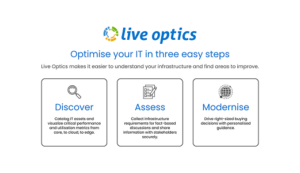
With our close partnership with Dell Technologies and extensive expertise in their solutions, we provide scalable and sustainable technology tailored to each client’s needs. Using Live Optics by Dell, we gain detailed insights into our clients’ IT environments, particularly in multi-vendor and multi-cloud systems.
Live Optics collects real-time data from servers, storage systems, and data protection environments, helping us assess performance and capacity efficiently.
What is Live Optics?
Live Optics is a free software tool designed to help businesses understand and optimise their IT infrastructure. It gathers real-time metrics on storage, servers, and data protection systems, offering a comprehensive overview of performance.
The tool supports a wide range of hardware, operating systems, and platforms, making it especially useful in multi-vendor and multi-cloud environments. It also provides cloud pricing comparisons for AWS, Google Cloud, and Azure, assisting in cloud planning decisions.
Key features include:
-
Server and Cloud Monitoring: Tracks performance and configurations for both physical servers and virtual machines.
-
File Management: Analyses storage growth, file types, and potential for archiving or compression.
-
Storage Analysis: Provides insights into storage hardware, including inventory, configuration, and performance.
-
Data Protection: Monitors backup systems and configurations, giving visibility into backup policies and capacity.
-
Workload Summaries: Generates reports on database performance and capacity.
How Murdoch Webster Uses Live Optics
Live Optics helps us provide data-driven solutions for our clients by:
-
Gaining Visibility into IT Infrastructure
Live Optics gives us a clear view of storage, server, and cloud performance, allowing us to identify bottlenecks, inefficiencies, and capacity issues quickly. -
Providing Data-Driven Recommendations
Based on real-time data, we offer precise recommendations for system upgrades, performance improvements, and capacity planning that are aligned with actual needs. -
Managing Multi-Cloud Environments
Live Optics supports multi-cloud environments, allowing us to evaluate performance across platforms like AWS, Google Cloud, and Azure, ensuring that clients’ infrastructure is optimised. -
Optimising Data Protection
By providing insights into backup systems and data protection policies, we ensure clients’ data is properly secured while identifying potential inefficiencies.
How Live Optics Benefits Businesses
Live Optics allows us to ensure that our clients’ IT systems are optimised for performance, reliability, and scalability. By addressing potential issues early, we help businesses avoid downtime and inefficiencies, keeping IT infrastructure aligned with their growth plans.
The tool collects metadata only, ensuring privacy and security while providing valuable insights. It does not access personal or application data, which makes it a non-invasive yet powerful assessment tool.

Live Optics provides crucial data for:
-
Infrastructure Optimisation: Pinpoints where resources are underutilised or overextended, enabling effective upgrades.
-
Cloud Migration Planning: Offers performance data and cost comparisons to support well-informed cloud migration decisions.
-
Data Protection Enhancements: Monitors backup capacity and ensures robust data protection measures are in place.
Live Optics by Dell is a valuable tool used by our Engineering team here at Murdoch Webster, enabling us to accurately assess and optimise IT environments. By providing real-time performance data, it allows us to offer tailored, data-driven recommendations for infrastructure upgrades and capacity management.
Need to better understand your IT scaling efforts? Contact us today to discuss how we can help you right-size your infrastructure.